For members and operators
Who can see what
What the server stores, what leaves it, and who you're trusting.
The short version
Your group picks one person to run the server, and that person controls the machine that stores the conversation and serves the app. Self-hosting takes the platform out of the middle, but the trust doesn't go away; it moves to someone you actually know.
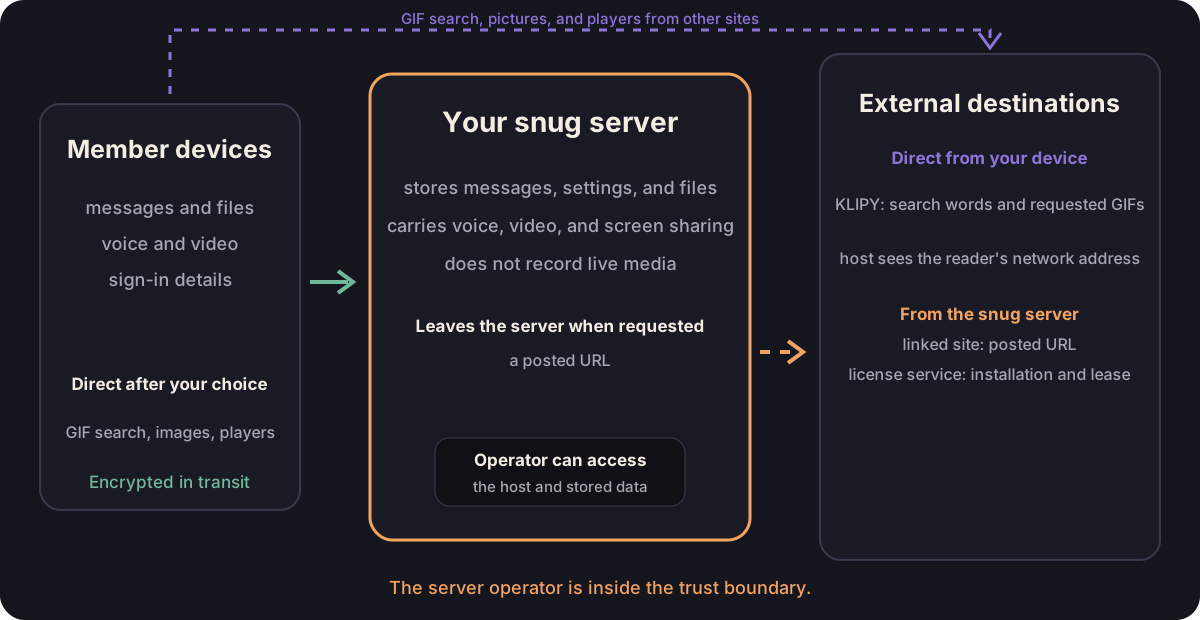
What the server can see
The server stores member names, sign-in details, settings, messages, and uploaded files. Whoever has host access can read or change any of it.
Voice, cameras, and screen shares pass through the server during a call, and snug does not record them.
The server's log notes when someone's connection closes and why, and when their call connection drops, by name and device name, so the operator can see why someone keeps getting cut off.
snug is not end-to-end encrypted. An operator who controls the running host could change the app or inspect stored data. That's the deal with self-hosting; make it with someone the group knows.
What encryption covers
Everything is encrypted in transit between each device and the server. The server itself still receives it; that's what lets it store your messages and route your calls.
At rest, encryption is the host's job. Operators should turn on disk encryption through the machine or VPS provider and keep off-host backups encrypted.
What can reach another service
The server makes a request when:
- someone posts a link: it fetches the link to make a preview, which sends that URL to the site it points at, and reads the first bytes of the page's picture to learn its size, which sends the picture's URL to the site that hosts it;
- someone gives a media bot a link: it asks that site for the title and, for anything but YouTube, fetches the sound from there as well;
- it activates its license with snug.chat, and on each scheduled check-in after that.
License activation and checks omit the domain, configured IP address, names, messages, files, call media, and stored data. The license service can still see the server's network address.
When the host follows updates, as the installer sets it up to, the host
command asks snug.chat for a newer release during the daily
update window and downloads it if there is
one. snug-ops upgrade asks the same question whenever the operator runs it,
and snug-ops status does on a host that follows updates. The port check
(snug-ops ports, which prepare and install also run) has snug.chat try
the server's ports from the internet, which tells snug.chat the server's
address and the port numbers and nothing else.
What you write with send feedback stays here for your own admins, along with the desktop app's log if you tick attach the app log. An error the app hits is shown only to you, to copy if you want to pass it on. When a call drops because snug couldn't repair its connection, the app also tells the server which repair step failed, and nothing else about the error.
Your browser makes a request when:
- you search GIFs, which sends the search words and your server's address to KLIPY and loads the returned previews from KLIPY's media hosts;
- a message carries a picture that lives on another site, such as a GIF, a photo, or the artwork on a link, and it loads as the message arrives;
- you open the player for a video or a song someone linked;
- you turn on stills for video cards, which asks YouTube or Vimeo for the picture on the card before anyone presses play;
- the media bot plays a YouTube video, which streams to your device straight from YouTube.
A browser request reveals your network address and the requested URL to that service. Pictures load on their own, because a channel full of friends should show what its friends sent.
If you would rather they didn't, turn off Show pictures from other sites under Settings > Appearance. Pictures in messages and on link cards then name their site and wait for you. Each yes covers that one address until you close the page, so an edited message asks again, and saying yes to a picture doesn't start the player sitting at the same address.
Players from YouTube, Spotify, and the rest wait for the press whichever way you set that. Their cards stay plain until you turn on Show stills on video cards, which each card offers a link to.
What to protect
An admin can set one shared password for joining with a new name. Changing it doesn't sign anyone out or unlink devices. An unlisted address reduces casual discovery, but it is not a secret; use trusted HTTPS before entering the password.
Operators: protect the host, state/.env, backups, and the .lic file.
Portable backups leave out protected license state, so keep the original
license file separately, and read the
new-host limits before moving a
license.
Members: link another device instead of sharing sign-in details or joining again under another name.