For members
Play music and video together
Queue something together, or find a link the bot played earlier.
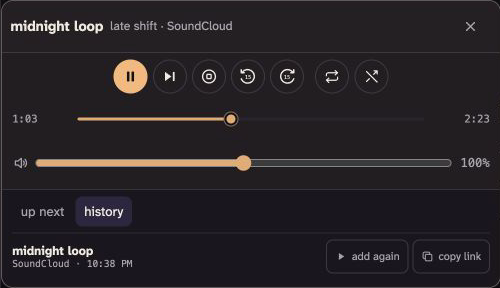
A media bot lives under a channel and plays into that channel's voice call, so everyone hears the same thing at the same moment. While something is on, its row under the channel shows moving bars and names what is playing. Join voice there, then select the bot to open its controls. Take turns picking what plays, or let one person run the night.
Queue something
Paste a link to a song, video, or playlist, or search the audio files people have uploaded. A playlist joins the queue in its original order. The bot leaves out unavailable and live entries. If the whole playlist won't fit, it adds nothing so you can clear some room and try again.
Use a public or unlisted YouTube playlist. A video link that includes a playlist adds that whole list. To add only the video, use its Share link without the playlist. YouTube may still block a particular video when you try to play it; skip that video to keep listening.
To use a link or uploaded file already in chat, open its actions and choose send to media bot. If your snug has several bots, choose the one you want. For a video file, the bot plays its first audio track in voice.
The server plays links from YouTube, YouTube Music, SoundCloud, Bandcamp, Mixcloud, Vimeo, Twitch, Dailymotion, Reddit, and X, unless the operator has changed that list. It expands a playlist when the provider exposes its tracks. When you paste something it can't play, the bot says so. Spotify links don't play; use a supported source or upload the audio instead.
Changing what plays takes two things: the control playback permission, and being in that channel's voice call. If the bot or the permission is missing, ask an admin.
Find something that played
Open history below the bot's controls. You can copy the original provider link or the snug link for an uploaded file.
If you have control playback and are in the bot's voice call, select play again. When something is already loaded, the pick goes into up next instead.
History only shows entries from channels you can still enter. Deleted uploads disappear too.
Add a bot
Adding a bot takes manage bots permission. Select manage bots beside the online count to add one. It starts in your current voice call when that channel is open to everyone; otherwise it starts in #home. For a restricted channel, an admin needs to give the bot that channel's role first.
Double-click the bot's name to rename it. You can also right-click the bot, or hold it on a touch screen, then select the pencil beside its name. A bot manager can turn it off, someone allowed to move people can move it through move to channel, and an admin can change its roles.
For playback controls, select a playing video's media controls button or right-click the video. Right-click controls open beside your pointer and stay inside the window, including in fullscreen.
Select manage bots to turn a bot back on or remove it. Turning it off takes it out of the call and keeps its queue until you turn it back on.