For members
Link another device
Bring your name and messages to a new device, or get back in after losing every one.
Your device is your key
snug has no password and no email to type. It remembers you by the device you joined from: that browser profile or that installed app. A private window, cleared site data, or a brand-new computer doesn't know you, so bring your name along by linking, not by joining again.
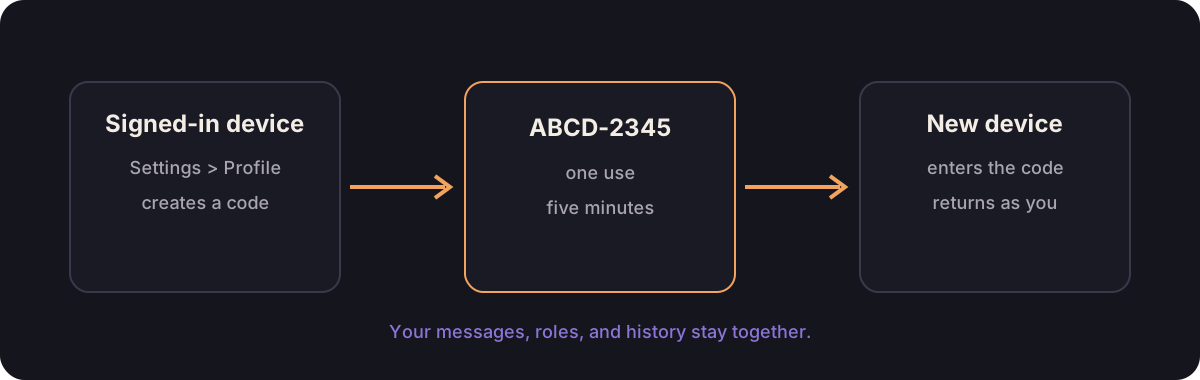
Link a new device
If your app asks for a server upgrade here, ask the person who runs the snug server to upgrade it before linking or managing devices.
On a device that already knows you:
- Open Settings > Profile.
- Select link another device.
On the new device:
- Open the same server address.
- Choose I have an account.
- Enter the visible code.
- Check the server and code, then select Link this device.
The code works once and expires after five minutes. Afterward both devices are you: same name, roles, channel access, direct messages, read state, and channel notification choices. The hardware side stays per-device: microphone, camera, hotkeys, sounds, appearance, and layout.
A call stays on one device at a time. Join voice from the second one and the call moves there. The device you left says which channel your call is in, and offers to bring it back.
Name or remove a linked device
Open Settings > Profile on any signed-in device. Under linked devices, give each one a name you'll recognize later, such as "kitchen iPad" or "work laptop."
If a device is lost or no longer yours, choose remove beside it and read the confirmation. That sign-in stops working straight away. Your name, messages, and other linked devices stay as they were. If you remove the device you're using, it signs out and needs a new code before it can return.
You can't remove your last sign-in. Link another device first so you still have a way back.
One entry, Older linked devices, may cover several browsers or apps that shared a sign-in before device names existed. Removing it signs out all of them together. Everything you link from now on appears separately.
If snug cannot save your sign-in
If snug says it cannot save your sign-in, allow site storage for this server in your browser, then try joining again. Clearing snug's site data removes this device's sign-in, so use a linked device or an admin's code to recover your existing name afterward.
If every device is gone
Ask an admin. They can open the people list, find your existing name, choose roles and admin, then make a sign-in code. That code brings you back as yourself.
If every admin is locked out too, the server operator can promote a member who can still sign in; recover the server shows that step.
Don't take a similar name as a shortcut. To snug that's a new person, with none of your messages and none of your roles.
Delete your account and shared content
Open Settings > Account, choose delete my account, and read the confirmation. Delete account forever removes your account, profile, messages, replies, reactions, poll contributions, plans, files, custom emoji, and private settings on that snug server. Every device loses its sign-in. This cannot be undone, and it affects only that snug server.
Admins can delete their accounts too. If the last admin leaves, the person running the server can restore admin access from the host. Nobody becomes a new founder automatically.
If the server refuses your saved sign-in because your account was banned or deactivated, an app connected to a current server also offers deletion on that refusal screen. Your saved device proves that it is your account; this does not let you enter conversations again. Keep that sign-in until you finish deletion. A revoked or lost device credential cannot prove ownership. Deactivations on older servers may have discarded the proof already; contact the person running that snug server for help locating your account.
If the app asks for an upgrade, the server does not offer full account erasure yet. Ask the person running it to upgrade before continuing. An older app's account deletion action may instead retire sign-in while retaining shared history; update the app to use the full-content confirmation above.
Other people's independent messages stay. A minimal anonymous record preserves existing moderation decisions and server administration. Old provider playback history did not record who requested it, so those public links remain unattributed. Before file ownership was recorded, an image shared independently by another member also stays with that member's reference. Copies someone saved elsewhere and server backups remain under their owner's control.